Tampilkan postingan dengan label Software. Tampilkan semua postingan

Rabu, 18 Februari 2015

0 Download CEP(cheat emulator psx)+Tutoria

hai sobat kali ini saya akan berbagi sedikit software yaitu CEP(cheat emulator psx),cheat ini hanya bisa untuk digunakan pada emulator PS 1/PSX,dan saya akan memberitahu cara memakai CEP ( cheat emulator psx)


untuk memakai CEP ini, ini caranya :


Ini ada cara untuk mengaktifkan gameshark code di psxfin emulator anda...
Yaitu dengan menggunakan software CEP ( cheat emulator psx)
Cara Pengunaan :
1) Download terlebih dahulu software CEP,klik disini
2) Setelah terdownload extract file tersebut pada tempat yang anda inginkan
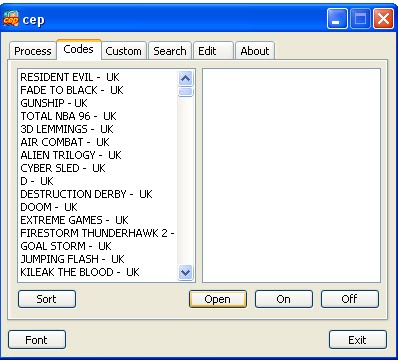
3) Setelah diextract, buka CEP.exe, lalu akan muncul tampilan seperti gambar dibawah ini :


4) Lalu masukkan gameshark code anda pada folder CEP, ada list di samping kiri. jika tidak ada bisa buat filenya dengan type file ".txt", sebagai contoh :
Infinite Health
800E7FEE 0010
Rubah menjadi :
"Infinite Health"
800E7FEE 0010
Lalu save filenya pada folder CEP anda dengan menggunakan Notepad.exe (file .txt)
5) Setelah gameshark code berhasil anda masukkan pada folder CEP, lalu buka kembali CEP.exe, setelah terbuka, lalu buka Emulator PSXfin anda, masukkan game yang akan anda mainkan.


6) Lalu kembali pada CEP.exe, pada tab "Process", isi "Select Application" dengan emulator PSXfin anda, lalu pada "Base Address Search" isikan dengan adress emulator anda setelah itu tekan tombol "Search".
7) Setelah berhasil membuka process emulator psxfin anda pada CEP.exe, pergi ke tab "Codes", lalu tekan tombol "Open" dan masukkan gameshark code yang telah anda simpan di folder CEP anda.


8) Setelah berhasil memasukkan gameshark code, aktifkan gameshark code yang akan anda gunakan dengan menekan tombol "On" pada tab "Codes", dan untuk mematikan gameshark codenya dilakukan dengan menekan tombol "Off" pada tab "Codes"


9) Lalu pergi ke tab "Custom", disana terdapat "Game Console" anda ganti dengan "Play Station", setelah itu disebelahnya terdapat "Code Engine" anda ganti dengan "GameShark/PAR", dan yang terakhir pada "Priority" anda ganti dengan "Idle".


10) Setelah mengatur seting pada CEP, lalu kembali pada emulator PSXfin anda, dan gameshark code yang anda aktifkan telah berhasil aktif.


Selamat mencoba....

Jumat, 13 Februari 2015

0 Free download Sony Vegas


- Sony Vegas adalah software yang berfungsi untuk mengedit musik, video, membuat film dll. Karena keunggulan Sony Vegas inilah banyak para editor menggunakannya untuk berbagai macam kebutuhan. Harga lisensi resmi Sony Vegas lumayan mahal karena memang software ini sangat multifungsi.


Sony Vegas Pro 11

Dan kali ini saya akan share software Sony Vegas Pro 11 ini dengan patch/keygen-nya agar bisa dipakai secara full tanpa harus membayar lisensi resminya. Berikut saya sertakan link download dan juga cara instalnya.


Screenshot :

System Requirements :

OS : Windows Vista SP2, 7 (32/64 Bit)
1 GB RAM
Windows Sound Card
Video Card Support ATI & GForce
Microsoft .Net Framework 3.5 SP1Download Link :

Sony Vegas Pro 11 | 32 Bit
Sony Vegas Pro 11 | 64 Bit
Patch
Password :
Cara Instal :
1). Instal Sony Vegas Pro 11-nya.
2). Disable dulu Anti-Virus di PC/Laptop kalian sebelum meng-ekstrak Patch, karena Patch dianggap virus.
3). Jalankan Patch, kemudian pilih Vegas Pro 11.0 (32 bit), karena saya menggunakan Windows 32 bit.


4). Browse folder Vegas Pro, Default: C:\Program Files\Sony\Vegas Pro 11.0, kemudian lanjut mencari folder shared plugins-nya. (Patch jangan di exit)
5). Sekarang jalankan Sony Vegas Pro 11-nya, masukkan serial yang dihasilkan oleh Patch.
6). Klik Next, lalu pilih yang registrasi "Another Computer", Next lagi.
7). Isi data diri sobat, klik Next lagi.
8). Kemudian masukkan Activation/Authenticantion code yang dihasilkan Patch ke form registrasi Sony Vegas Pro 11.0.
9). Selesai.

Rabu, 11 Februari 2015

0 Smadav 2015 Free Download


 Smadav 2015 Free Download – Until now a lot of these types of applications that offer various advantages of each. Latest SmadAV provide a solution for computer users who have virus problems. Most antivirus can not be installed simultaneously with other antivirus, it is natural because it is designed for primary protection on the computer. In contrast to smadav, it is a useful application for added protection so that it will be compatible even if installed with other similar software.

It will serve as both a protective layer if your main antivirus is unable to handle malware and spyware. And now present SmadAV 9.7.1 Rev 2014 more updated as the addition of new virus database, the main display, the installation process improvements, additions pendektesian technique viruses on USB. It has its own way (behavior, heuristic and whitelisting to detect and cleanup that will further enhance the security of your computer.

Due to resource usage SmadAV very small, it will not add to the weight of computer system performance. It is suitable for computers that are rarely or not even been connected to the Internet. in all other Antivirus use in conjunction with the latest 9.7.1 Rev 2014 SmadAV be highly recommended in order to fortify the computer to the fullest.


Cara Installasi :
Install Smadav Seperti biasa
Jika sudah, pilih bahasa yang ingin digunakan
Aktifkan Perlindungan Smadav
Jika sudah menginstall masukan serial number pada Tab " Manage " -> " General Setting "
Serial Numbernya bisa sobat lihat pada file yang sudah sobat Download Tersebut. :)
Smadav Kamu sudah menjadi Pro
Selamat Menggunakan Smadav Pro Terbaru 2015...
Cara Aktivasi Smadav Pro 10.0.0 Anti BlackList :1. Jalankan SmadAV - Klik Manage- General Setting
2. Isikan Nama dan Serialnya sesuai data dibawah ini :


Serial Number Smadav 2015 Pro Rev 10.0 :Type : Personal
Name : http://jembersantri.blogspot.com
Key : 085700762203

Type : Warnet
Name : http://jembersantri.blogspot.com
Key : 779877762203

Type : Perusahaan
Name : http://jembersantri.blogspot.com
Key : 999899762203


TIPS :

Untuk SMADAV 9.x Disarankan menggunakan tipe lisensi PERSONAL


CARA MENGHILANGKAN BLACKLIST SMADAV 10.0.0
1. Exit SMADAV RTP (Klik Kanan Tray Icon - EXIT)
2. Disconnect Internet
3. Klik Start => Run atau tekan logo Windows + R
4. lalu ketik "Regedit" untuk menjalankan registry editor.
5. Lalu buka
"HKEY_CURRENT_USER > Software > Microsoft > Notepad" pada registry editor.

6. Kemudian cari "lfPitchAndFamily", "lfPitchAndFamily2", dan "lfPitchAndFamily3", bila sudah ditemukan hapus semua lfPitchAndFamily.
7. Selanjutnya buka C:\Program Files\Smadav dan klik 2 kali pada file "SMARTP.exe" untuk menjalankan Smadav.
8. Buka Pada Tab Setting, Isikan datanya sesuai keygen

System Requirements :
Windows XP/Windows Vista/Windows 7/Windows 8/Windows 8.1 32-bit and 64-bit (x86 and x64) For Windows PC

Software Name
Link
Smadav 2015 Free Download

Sabtu, 31 Januari 2015

0 IDM ( Internet Download Manager )


Manually Starting A Download In IDM
internet Download Manager is the choice of many, when it comes to increasing download speeds up to 5x. IDM has a clever download logic accelerator that features intelligent dynamic file segmentation and incorporates safe multipart downloading technology to increase the speed of your downloads. IDM reuses available connections without additional connections to gain the best acceleration performance.

Internet Download Manager houses a comprehensive error recovery system with resume capability features. These will restart interrupted downloads due to lost connections, network issues, power outages and system shutdowns. IDM has a simple GUI, which makes it easy to use, or if you prefer, you can use Internet Download Manager from the command line interface.

Features include:
Resume and schedule downloads.
Resume capability
Error Recovery
Proxy Server Support
FTP and HTTP Protocol Support
MP3 audio and MPEG video content processing
Multilingual support

IDM will integrate effortlessly into your web browser of choice, whether that be Microsoft Internet Explorer, Opera, Mozilla Firefox or Google Chrome, in fact almost all other popular browsers are supported to automatically handle your downloads. You can download music and video files in the form of MP3, FLV, MPEG and a multitude of other formats.

This latest version of IDM (6.18) has resolved issues with 1080p HD video recognition in Google Chrome. There is also a new feature to take over https downloads in Google Chrome (it adds a feature to Show download this video/audio panel for https videos in the browser). IDM has also added Windows 8 compatibility and it features Windows 7 and Windows Vista support Internet Download Manager also adds improved integration for IE 10 and IE based browsers, has an improved toolbar, and lots of other improvements and features such as a video page grabber, a redeveloped scheduler and MMS protocol support.

Selasa, 20 Januari 2015

0 Photoshop CS3

Download Adobe Photoshop CS3 Photoshop CS3 memberikan Anda kemampuan untuk bekerja lebih produktif , mengedit dengan kekuatan tak tertandingi , dan komposit dengan alat terobosan . Fitur baru untuk produktivitas meliputi : streamline antarmuka Peningkatan Camera RAW Kontrol yang lebih baik atas pilihan cetak Dukungan PDF ditingkatkan Manajemen yang lebih baik dengan Adobe Bridge Alat editing baru untuk CS3 adalah palet Sumber Clone dan tak rusak Smart Filter . Fitur lainnya seperti Kecerahan / Kontras penyesuaian dan Vanishing Point modul yang sesuai dengan keinginan anda.

Kamis, 15 November 2012

0 ASSASINS KEYLOGGER [KEYLOGGER TERKUAT DAN TERAMPUH 2012]


ASSASINS KEYLOGGER [KEYLOGGER TERKUAT DAN TERAMPUH 2012]

Assasin Keylogger Screen Shot


SEND OPTIONS 
[v] SMTP(GMAIL,HOTMAIL)LOG TYPES
[v] Keyboard Hook

SEND OPTIONS 
[v] SMTP(GMAIL,HOTMAIL)LOG TYPES
[v] Keyboard Hook 
[v] ScreenLog
[v] Clipboard Log 
STEALERS
[v] FireFox 5*New
[v] Google Chrome
[v] Opera
[v] slave Pc Info[v] slave Ip ,Location ,Isp ,City
[v] Installed Software 
[v] Windows Product Key
[v] IDM Info
[v] No-Ip 
[v] CD Keys
DISABLE ITEMS
[v]CMD
[v] Firewall
EXTRAS
[v] Custom Fake Message
[v] File Pumper[v] Icon Changer
[v] Coded in Visual Basic .Net - Client & Server only require .NET Framework 2.0 or above 
[v] User Friendly GUI 
[v]Remote Log Breaker -you can break logs at anytime 
[v] Custom Interval -Send logs at specified Interval

Virus Report

File Info

 Report date: 2011-07-05.
 Scan Occured: 
 Link to scan: http://my-avscan.com/result.php?scan=OTMwMDY=
 File name: Server.exe
 File size: 639352 bytes
 MD5 Hash: b629e4fbccc7208660aeda0a77b13090 
 SHA1 Hash: 0e0f714ca75a1b77a71e25d5f1940880f2b5024a 
 Detection rate: 0 out of 34 
 Status: CLEAN 

Detections

 AVG - Clean.
 Acavir - Clean.
 Avast 5 -Clean.
 Avast -Clean.
 Avira -Clean.
 BitDefender -Clean.
 VirusBuster Internet Security -Clean.
 Clam Antivirus -Clean.
 COMODO Internet Security -Clean.
 DrWeb -Clean.
 eTrust-Vet -Clean.
 F-PROT Antivirus -Clean.
 F-Secure Internet Security -Clean.
 G Data -Clean.
 IKARUS Security-Clean.
 Kaspersky Antivirus -Clean.
 McAfee -Clean.
 MS Security Essentials -Clean.
 ESET NOD32 -Clean.
 Norman -Clean.
 Norton -Clean.
 Panda Security -Clean.
 A-Squared Security -Clean.
 Quick Heal Antivirus -Clean.
 Rising Antivirus -Clean.
 Solo Antivirus -Clean.
 Sophos -Clean.
 Trend Micro Internet Security -Clean.
 VBA32 Antivirus -Clean.
 Vexira Antivirus -Clean.
 Webroot Internet Security -Clean.
 Zoner AntiVirus -Clean.
 AhnLab V3 Internet Security -Clean.
 Bullguard -Clean. 
Scan report generated by
my-avscan.com


Download : PM Link On Facebook > Click  Disini

Jumat, 02 November 2012

0 Avant Browser 2012 build 187, 10.11.2012


Avant Browser 2012 build 187, 10.11.2012

Click here to see what's new in Avant Browser lastest released version.
Lite Version only includes IE rendering engine
Download
Ultimate Version includes IE, Firefox and Chrome rendering engines
Download
Thank you for using in Avant Browser. If you think Avant Browser is valuable and want to let more people know how great it is, please post your positive review to Download.com.

Extras:

Avant Browser USB Disk Version

A self-extracting ZIP archive of Avant Browser. This version saves all user profiles in the same folder of Avant Browser Application.

Set File Time - Tools Designed by Avant Force

An easy-to-use and free tool for batch changing files' date and time in a folder and all sub-folders.
(For Windows XP/2003 Server/Vista/7/2008 Server).

Avant Browser 11.7 Build 46

Avant Browser Skins Maker

Make your own customized skins using this intuitive, easy to use, and powerful program.

RoboForm Plug-in for Avant Browser

Still trying to remember passwords? Still filling out online forms manually? RoboForm plug-in will help you do it. Passwords are securely stored in your computer and protected by Master Password. With RoboForm, you can fill out any form with just one click.

Registry Medic (Download Bandwidth Sponsor)

Fix your registry & improve your PC's performance! Is your PC becoming increasingly slow and unstable? If so, you need a professional registry cleaner and repair tool. Installing and uninstalling software can make your registry a mess, leading to decreased PC performance and causing computer crashes. Registry Medic uses a highly intelligent engine to fix your registry & improve PC performance! Click here to try it now!

Minggu, 10 Juni 2012

0 Download Photoscape Gratis


Download Photoscape Gratis Versi Terbaru

free download photoscape terbaru
Download Photoscape
Kalau berbicara software foto editor terbaik tentu Adobe Photoshop adalah jawabannya. Namun sayang Adobe Photoshop bukan termasuk software gratisan sehingga untuk mendapatkannya anda harus membelinya terlebih dahulu dengan harga hingga ratusan dollar. Namun anda jangan khawatir karena sekarang anda bisa download photoscape sebuah software foto editor sama seperti Adobe Photoshop. Salah satu kelebihan yang paling menonjol dari photoscape ialah karena bisa di dapatkan secara gratis.
Berikut ini adalah beberapa fitur pilihan yang bisa dinikmati oleh seorang desainer grafis ketika menggunakan photoscape:
  1. Viewer. Berfungsi untuk melihat-lihat foto yang ada di folder anda dan menampilkannya dalam bentuk slide show
  2. Editor. Mengubah ukuran gambar, penyesuaian kecerahan warna gambar, koreksi latar belakang, bingkai, modus mosaic, balon, tas, menambahkan teks, memotong gambar, filter, memperbaik merah.
  3. Batch Editor. Mengedit beberapa foto.
  4. Page. Menggabungkan beberapa buah foto untuk didesain dan disatukan ke dalam sebuah lembaran kertas.
  5. Combine. Lampirkan beberapa photo secara vertical maupun horizontal untuk dijadikan sebagai foto terakhir.
  6. GIF Animasi. Gabungkan beberapa buah foto untuk dijadikan satu file animasi.
  7. Print. Berfungsi untuk mulai mencetak gambar.
  8. Splitter. Mmebuat slice foto menjadi beberapa bagian.
  9. Screen Capture. Berfungsi untuk menangkap tampilan pada desktop komputer anda.
  10. Color Picker. Fasilitas untuk mengatur warna tertentu dengan cara menzoomkan terlebih dahulu.
  11. Rename. Mengganti nama file foto anda.
  12. Raw Converter. Berfungsi untuk mengkonversi file-file anda yang berformat RAW ke JPG.
  13. Paper Print. Cetak berbaris, grafis, mudah dan kertas kalender.
  14. Face Search. Untuk mencari wajah yang serupa melalui internet.
Jika anda adalah seorang yang sangat pemula di dalam menggunakan photoscape mungkin setelah mendownload photoscape anda akan merasa bingung bagaimana cara menggunakan photoscape untuk mengedit photo. Berikut ini saya berikan juga video tutorialnya sehingga anda bisa belajar menggunakan photoscape sekarang juga:
  1. Photoscape – Editor 1 http://www.youtube.com/watch?v=AT69dAVe8Zc&feature=related
  2. Photoscape – Editor 2 http://www.youtube.com/watch?v=SMYzq65YXLE&feature=related
  3. Photoscape Tutorial – Clone Effect & Filters http://www.youtube.com/watch?v=F1u1KEnfMkQ&feature=related
Bagi yang ingin segera download photoscape silakan melalui link berikut ini:

Incoming search terms:

  • cara download photoscape
  • download photoscape versi terbaru
  • cara mendownload photoscape
  • free download photoscape full version
  • download photoscape gratis
  • download photoscape full version
  • Mendownload photoscape
  • download photoscape terbaru full version
  • download photoscape free full version
  • cara mendownload photoscape gratis

Selasa, 22 Mei 2012

0 Download Maxtron browser


Kumpulan Software Gratis | Maxthon Browser 3.3.8 Full Freeware | Maxthon browser to re-release the final version 3.3.8.200 Maxthon Browser. Maxthon browser is the browser software that admirable ability. The browser is able to open a site with light. Interface in it a complete yet lightweight, making this software is recommended for surfing the internet.
 
Maxthon is based on Dual Display Engines, and you can view all webpages within a great layout with great compatibility and high speed. It has a set of very powerful and customizable built-in features, taking your internet experience from viewing to doing.

Maxthon Brings The Cutting Edge Browsing Experience Created by people thinking out of the box to come up with innovative Airways to use on the Internet. Available in 37 languages. 600 million downloads.
 
Maxthon Works the Way You Want It To

Customize Maxthon's User Interface, Icons, Skins, Layouts, Tool Bars as the way you like it. Do not like Menu? Use Shortcut keys. Shortcut keys do not like? Use URL Alias. Do not like the URL Alias? Use Mouse Gestures.

Innovative browsing modes: New Private Window to browse under cover, New Session to log-in a same site with different accounts, Split-screen to view web pages side by side.

Maxthon is So Secure You Can Throw Away That Blanket
 
 
The built-in Ad Hunter blocks harmful, or just irritating ads, images and pages. You can also block specific ad on a web page by clicking it.

Most loved features in Maxthon take your Internet experience from viewing to doing. Sync seamlessly Use a Maxthon Passport to sync and access your favorites, notes, even browsing preference in any devices.

One-click Undo Tab Recover accidentally closed tabs by clicking on the 'Restore Last Recent Page' button. Maxthon Resource Sniffer detects if you are on a web page with videos, images and audios. Click the button to get the list and download any of them.
 
Pop-up Video Maxthon can detect if you are on a web page with video, so you could open it as a pop-up or save it. Snap Easy and fast to capture a snap and edit it with Highlight, Blur and Bubble External Tool Get instant access to your favorite program. Easy to add, delete, sort and drag.

Maxthon 3 is a free web browser Quickly the which has developed a large fan base, due to its completely customizable and user-friendly interface, as well as high speed and good overall performance. Also, Maxthon has Several useful features to help you aim That improv navigation.

For example, there is an undo button for any tabs That you have accidentally closed, and a search toolbar with eight different search engines, new private window and new session options.
 
Capturing an image, a whole webpage or a region does not require installing an add-on (as other web browsers usually do) Because now you have a single button called Snap (exports file as. Png,. Bmp, or. Jpg)

External Tools offer quick launch to any software on the computer, Such as Paint or Calculator, and there is a built-in notepad That runs faster than Windows' Notepad, the which you can use to write notes, or even scripts and run them in Maxthon 3.

Resource Sniffers show page features history and detects whether a page contains video, audio, images or just plain text (and you can download any of them too), while a translate button redirects you to a specified link for language translation purposes (the default is Google Translate).
 
By pressing F10 you activate split screen for easy navigation Between webpages (similar to Total Commander for file managing), and the most fun part about Maxthon relies probably within mouse gestures (for example, by simply dragging a link from any webpage, you can open it in a new tab).

When it comes to security and convenience, Maxthon 3 comes with a built-in Ad Hunter blocks unnecessary ads, images and pages, a Feed Reader That ensures you have all your news at hand, whereas the Download Manager can help you easily access all the items you grabbed.

Maxthon 3 is Likely to surprise you with its simplicity and efficiency, ESPECIALLY in this highly competitive market. Furthermore, everything about Maxthon 3 is completely customizable, so you can create your own web browsing experience.
 
Key Feature:

· Online Favorites Service: Access your Favorites contentanywhere with Maxthon Online Favorites Service. The encrypted stand-alone Favorites file format can protect your privacy on a shared computer.
· Tabbed Browsing: All the web pages are arranged as tabs inside main window to ease your navigation.
· Mouse Gestures: Hold right mouse button and perform the gestures to access common features Such as Back, Forward,Refresh and Close Tab.
· Super Drag & Drop: Type the keywords in Address Bar then press Enter to perform a search. Or simply drag & drop a keyword with your mouse.
· Ad Hunter: Ad Hunter can efficiently clean up the web pages by stopping Popup Windows and removing Ad Content Blocks.
· Fully Customizable: Plugins. Skins. Filter Packs. Multi-language

Requirements:

· CPU 1 GB
· 512MB of RAM
· 64MB of Free Hard Disk Space
· Microsoft Internet Explorer

What's New in This Release:

New Features:
· Supported HTML5 Microdata
· Added "Internet Options" menu to proxy
· Added a prompt message when exited Maxthon Browser

Fixes:

[Main Frame]:
· "Close with Maxthon" in External Tools did not work
· Could not remember window size SkyNote
· Improved Address Bar search logic

[Webkit Core]:
· Could not View Source of. Svg images.
· Directory navigation bar of the file protocol is displayed incorrectly
· Did not block popup windows some
· Fill Magic did not work for some sites

[Extension Platform]:
Extensions · still ran even after being disabled
 
Password : www.koransoftware.com

Related Articles